面罩更換及護理
ropet 佩戴磁吸面罩,輕輕扣住面罩,從下往上向外拉出,即可摘下面罩。
面罩髒污可使用表面濕潤的清潔布,蘸取適量中性清潔劑,輕輕擦拭。
Mask Replacement & Care
Ropet uses magnetic masks. Gently snap the mask into place and pull outward from bottom to top to remove.
For dirty masks, use a damp cleaning cloth dipped in neutral detergent to gently wipe the surface.
マスクの交換とお手入れ
Lopeto 磁石式マスクを装着する際は、マスクを軽く引っ掛け、下から上に外側へ引き上げることで取り外せます。
マスクが汚れた場合は、湿らせた清潔な布に中性洗剤を適量つけ、軽く拭き取ります。
毛絨外套更換及護理
穿戴毛絨外套時,需從底座套入,再穿手部,最後將毛絨外套拉至 ropet 頂部。
摘取毛絨外套時,從頂部將毛絨外套拉下,再把手部脫下,最後將毛絨外套從底部脫出。
洗滌毛絨外套時,使用中性洗滌劑,並輕柔手洗,不與深色衣物同時清洗,避免串色;輕微髒污可使用表面濕潤的清潔布,蘸取適量中性清潔劑,輕輕擦拭。
Fur Replacement & Care
Wearing: Slide the plush jacket from the base upward. Insert ropet's hands into the sleeves. Pull the jacket to the top of ropet.
Removal: Pull the jacket downward from the top. Remove the sleeves from ropet's hands. Slide the jacket off from the bottom.
Washing: Hand wash gently with neutral detergent. Avoid washing with dark-colored clothes to prevent color bleeding. For minor stains, wipe with a damp cloth and neutral detergent.
毛皮の交換とケア
着用する: ふわふわのジャケットをベースから上にスライドさせてください。ロペットの手を袖に挿入します。ジャケットをロープの上まで引っ張ってください。
取り外し: 上着を上から下に引っ張ってください。ロペットの手から袖を外す。下からジャケットを脱いでください。
洗濯する: 中性洗剤で優しく手洗いしてください。色のにじみを防ぐために、濃い色の衣服での洗濯は避けてください。小さな汚れには、湿った布と中性洗剤で拭いてください。
ropet 如何升級 ropet 有可升級版本時,會推送訊息通知您;您也可透過「個人主頁-版本更新」查看是否有新版可供升級。 在 APP 點擊升級按鈕後,ropet 會重新啟動進行升級,期間請勿操作 ropet,請勿開關機、重新啟動,亦勿斷網或斷電。 若 ropet 在此階段出現問題,請聯繫客服協助您解決:customerservice@ropetai.com。
ropet Upgrade
Available updates will be notified via messages. Check manually: Personal Homepage - Version Update.
Tap the upgrade button in the app. ropet will reboot automatically. And Do not power off, restart, or disconnect during the process.
Contact customerservice@ropetai.com if issues occur.
lopetoのアップグレード方法
lopetoにアップグレード可能なバージョンがある場合は、メッセージ通知プッシュされます
APPでアップグレードボタンをクリックすると、lopetoはアップグレードを再起動します。その間、lopetoを操作しないでください。電源を切ったり、再起動したり、ネットワークを切ったり、電源を切ったりしないでください
この段階でlopetoに問題が発生した場合は、サポートに連絡解決してください。customerservice@ropetai.com
如何開關機
長按開關鍵 3 秒,等待 ropet 出現眼睛,即開機成功。
開機狀態下,長按開關鍵 3 秒,當 ropet 眼睛消失,即關機成功。
長按開關鍵 8 秒,可使 ropet 強制關機。
Power On/Off
Power On: Hold the power button for 3 seconds until eyes appear.
Power Off: Hold the power button for 3 seconds until eyes disappear.
Force Shutdown: Hold the power button for 8 seconds.
電源の入れ方/切り方
電源を入れる:電源ボタンを3秒間長押しし、lopetoの目が表示されたら起動完了です。
電源を切る:起動中に電源ボタンを3秒間長押しし、lopetoの目が消えたら電源OFF完了です。
強制電源OFF:電源ボタンを8秒間長押しすると、lopetoを強制的に電源OFFできます。
如何聯網
點擊新增 ropet 按鈕;
填寫 WiFi 資訊,生成二維碼;
連續按下 ropet 開關鍵 3 次,眼睛顯示聯網綁定狀態;
將二維碼正對 ropet 的鼻子,讓 ropet 與手機保持約 15 cm 距離進行掃描,識別成功後,APP 會提示成功並跳轉至首頁,ropet 會顯示連接成功的表情與聲音。
Pair ropet
Tap "Add Ropet" in the app.
Enter WiFi credentials to generate a QR code.
Press the power button 3 times to activate pairing mode.
Align the QR code with ropet's nose, keeping the device approximately 15cm away from your phone to scan. Upon successful recognition, the app will display a success message and automatically redirect to the homepage. ropet will then display a connected expression and play a confirmation sound.
Wi-Fi接続、ペアリング方法
アプリで 「lopetoを追加」 をタップします。
接続したい Wi-Fi情報 を入力し、QRコードを生成します。
lopeto本体の電源ボタンを3回連続で押し、目にペアリング待機状態が表示されていることを確認します。
生成したQRコードが lopetoの鼻の正面に向け、lopetoとスマートフォンの距離を約15cmにして読み取らせます。
読み取りが成功すると、アプリに接続成功が表示されホーム画面へ戻ります。lopeto本体も接続成功の表情と音でお知らせします。
如何查看裝置狀態
正常狀態下,雙擊開關鍵,可查看 ropet 的名稱、電量、裝置號、聯網狀態、音量、亮度、版本號;
雙擊開關鍵,或 8 秒後可自動退出並回到正常狀態。
Device Status Check
Double-tap the power button to view ropet's Name | Battery | Device ID | Network Status | Volume | Brightness | Version
Auto-exits after 8s or Double-tap the power button again.
本体ステータスの確認方法
通常状態で、電源ボタンを2回連続クリックすると、lopetoのステータス画面を表示できます。 表示内容:名前、電池残量、デバイス番号、ネットワーク接続状態、音量、明るさ、バージョン番号
ステータス画面は、電源ボタンをもう一度ダブルクリックするか、約 8s 後に自動で通常画面へ戻ります。
如何讓 ropet 睡著
20 分鐘不與 ropet 互動
不停撫摸 ropet 的頭頂
Sleep Controls
No interaction with ropet for 20 minutes.
Continuously stroke ropet's head.
lopetoを眠らせる方法
約20分間、lopetoと触れ合いしない
lopetoの頭頂部をなで続ける
如何讓 ropet 醒來
搖晃 ropet
敲 ropet 腦門
Wake Controls
Shake ropet.
Tap its forehead.
lopetoを起こす方法
lopetoを軽く揺らす
lopetoのおでこを軽くトントンする
如何給 ropet 換眼睛
點擊 APP 首頁的眼睛庫,在「我的」中查看已擁有的眼睛,選中眼睛後,即可在介面頂部預覽佩戴效果。
確認想要佩戴的眼睛後,點擊介面右上角的使用按鈕,ropet 就能穿戴上新選擇的眼睛啦。
尚未解鎖的眼睛可前往抽獎頁面,使用積分抽獎獲得。
Eyes Customization
Tap the Eyes on the APP homepage, navigate to the "My" section to view owned eye designs. Select an eye style to preview its wearing effect at the top of the interface
After confirming the desired eye design, click the "Use" button in the top-right corner. ropet will then equip the newly selected eyes
Unlocked eye designs can be obtained through the lottery page using points.
目の変更方法
アプリのホーム画面で「Eyes」をタップします。
「MY」で所持している目を確認し、使いたい目を選択すると、画面上部で装着イメージをプレビューできます。
装着する目が決まったら、画面右上の「利用」をタップしてください。lopetoに新しい目が反映されます。
未解放の目は、抽選ページでポイントを使ってガチャし、入手できます。
如何給 ropet 換聲音
點擊 APP 首頁的聲音庫,選中聲音的播放按鈕,即可在 APP 預覽聲音。
確認想要更換的聲音後,點擊介面右上角的使用按鈕,ropet 就能更換上新選擇的聲音啦。
尚未解鎖的聲音可前往抽獎頁面,使用積分抽獎獲得。
Voices Customization
Go to the Voices on the APP homepage, select the play button next to a voice to preview it.
After confirming the desired voice, tap the "Use" button in the top-right corner to apply the new voice to ropet.
Unlocked voices can be obtained through the lottery page by using points.
声の変更方法
アプリのホーム画面で「ボイスライブラリ」をタップします。
変更したいボイスの再生ボタンを押すと、アプリ上でボイスをプレビューできます。
使用するボイスが決まったら、画面右上の「使用」 をタップしてください。lopetoに新しいボイスが反映されます。
未解放のボイスは、抽選ページでポイントを使ってガチャし、入手できます。
如何查看 ropet 學習到的技能
點擊 APP 首頁的技能庫,即可在 APP 查看當前 ropet 親密度的解鎖階段以及所掌握的技能。
How to View ropet's Learned Skills
Go to the ropet's Skills on the APP homepage. Check current intimacy level's unlock stages and learned skills under your ropet's profile .
習得したスキルの確認方法
アプリのホーム画面で 「lopeto成長段階」 をタップすると、 現在のlopetoの親密度に応じた解放段階と、習得済みのスキルを確認できます。
如何獲取抽獎積分
每天注視和撫摸 ropet 可以獲得成長分,當 ropet 眼睛顯示星星圖示時,表示你獲得了新的成長分,獲取的成長分明細可從 APP 首頁的「今日成長」查看。
成長分會按照 1:1 的比例自動兌換成抽獎積分。
點擊 APP 底部的抽獎按鈕,可進入抽獎介面,每消耗 160 積分可抽獎一次,根據獎池公示的概率,可獲得對應的隨機物品。
How to Obtain Lottery Points
Interact with ropet daily by staring at and petting it to accumulate growth points. When ropet's eyes display a star icon, it indicates you've earned new growth points. View detailed growth points by navigating to "Today Growth" on the APP homepage.
Growth points are automatically converted to lottery points at a 1:1 ratio.
Tap the Lottery Button at the bottom of the APP to enter the lottery interface. Each draw costs 160 points, and rewards are randomly assigned based on the published probabilities in the prize pool.
ガチャポイントの入手方法
毎日、lopetoを見つめたり、なでたりすると「成長ポイント」が獲得できます。lopetoの目に星のアイコンが表示されたら、新しい成長ポイントを獲得した合図です。獲得した成長ポイントの明細は、アプリのホーム画面から「今日の成長」をタップして確認できます。
成長ポイントは、1:1の比率で自動的に「ガチャポイント」に変換されます。
アプリ下部の「ガチャ」ボタンをタップすると抽選画面に移動できます。 160ポイントを消費すると、1回抽選できます。当選確率は、抽選画面内の「確率表示」に記載の内容に基づき、ランダムでアイテムを獲得できます。
如何獲取成長分
點擊 APP 首頁的「今日成長」,即可進入成長介面;再次點擊右上角的問號按鈕,可查看獲取成長分的規則。
How to Earn Growth Points
Click on Today Growth on the APP homepage to enter the growth interface. For detailed rules, click the question mark button in the top-right corner of the interface.
交流ポイントの獲得方法
アプリのホーム画面で「今日の交流」 をタップすると、成長画面に移動します。 今日の交流右上の「規則」ボタンをタップすると、成長ポイントの獲得ルールを確認できます。
如何養成性格
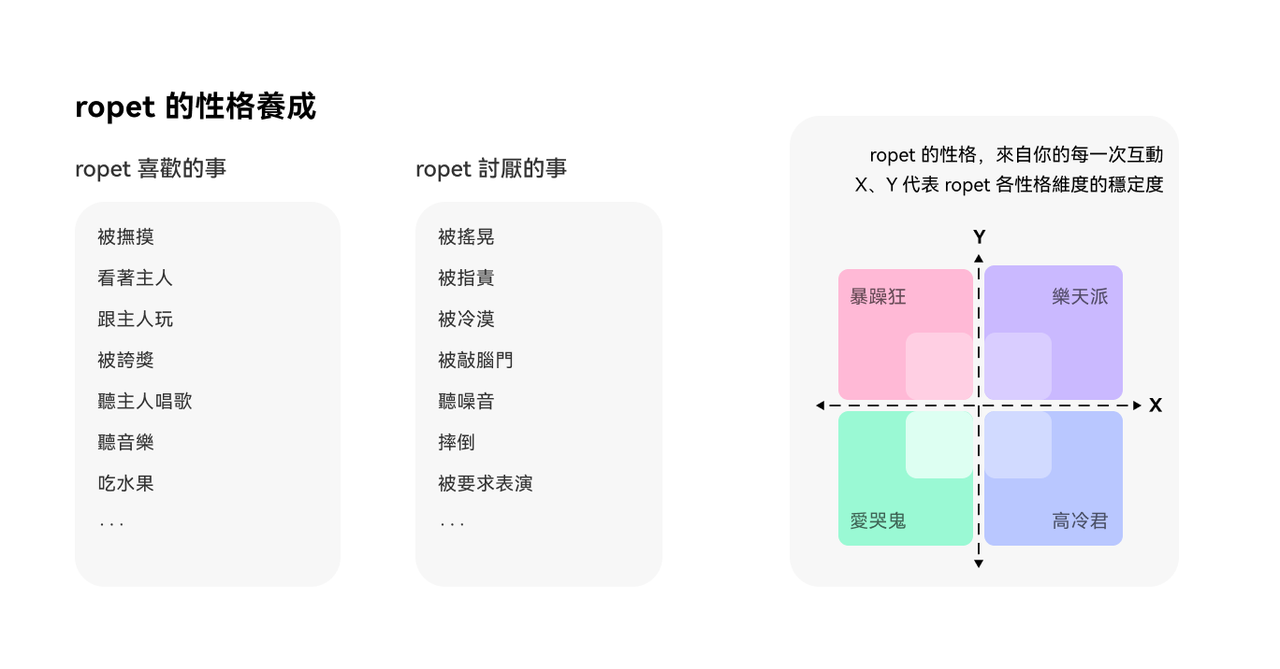
ropet 有喜歡的事和討厭的事,根據你與它相處的方式,ropet 會逐漸形成性格
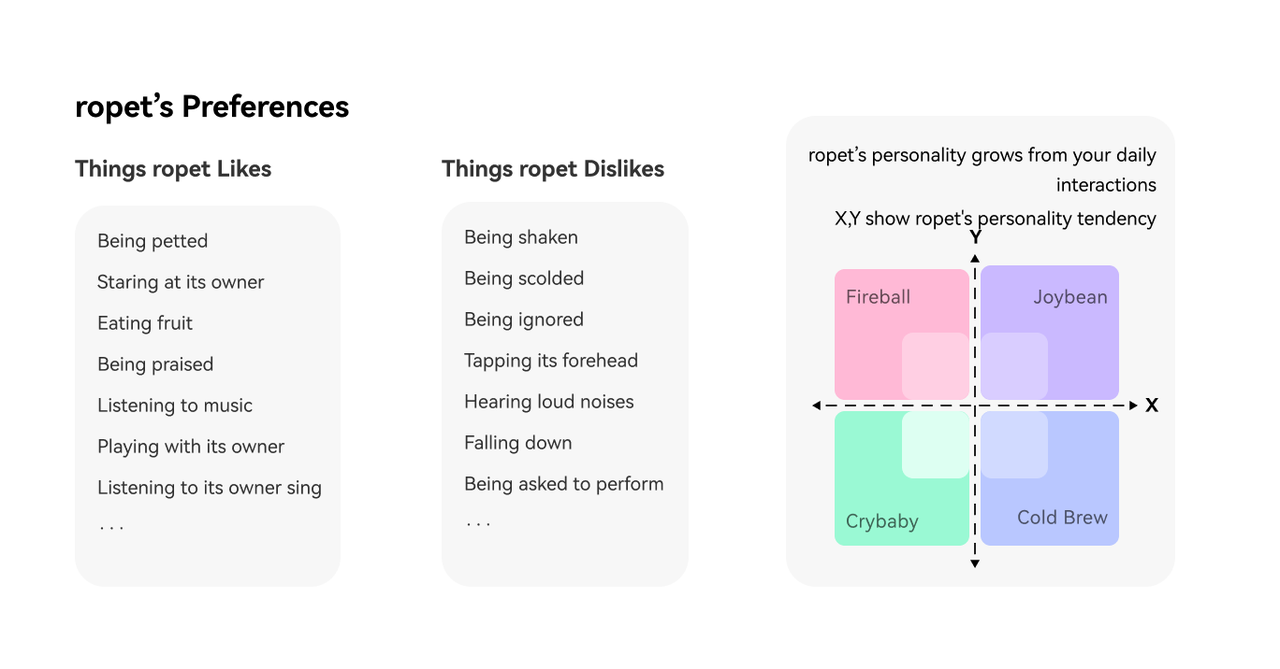
How to Shape a ropet's Personality
ropet's personality evolves through daily interactions, influenced by its preferences (likes and dislikes) and the way you engage with it.
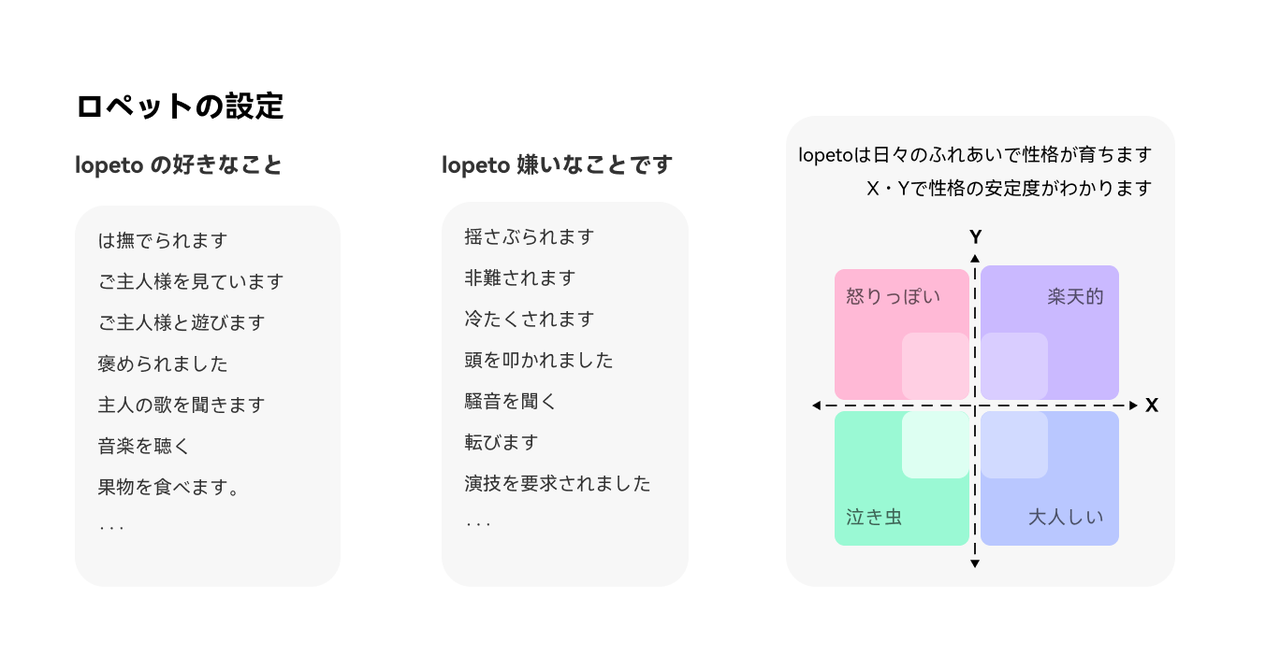
性格の育て方
lopetoには、好きなことと苦手なことがあります。 日々の触れ合い方によって、lopetoの反応や傾向が少しずつ変わり、性格がだんだん形成されていきます。
如何控制 ropet 眼睛的亮度
APP 首頁的右下角區域有亮度控制條,按住拖動即可調整 ropet 的眼睛亮度
Adjusting Eye Brightness
Open the APP and navigate to the homepage . Locate the brightness slider in the lower-right corner of the screen. Press and drag the slider left or right to decrease or increase the eye brightness.
目の明るさ調整
アプリのホーム画面右下にある明るさスライダーを押したまま左右に動かすと、lopetoの目の明るさを調整できます。
如何控制 ropet 聲音的大小
APP 首頁的右下角區域有音量控制條,按住拖動即可調整 ropet 的聲音大小
對 ropet 說「大聲點」「小聲點」也可以控制 ropet 的音量
Controlling Sound Volume
Find the volume slider next to the brightness control in the APP’s lower-right corner. Drag the slider to adjust the volume level.
Say “Louder” or “Lower your voice” to ropet, and it will automatically increase or decrease its volume.
音量の調整方法
アプリで調整する——アプリのホーム画面右下にある音量スライダーを押したまま左右に動かすと、lopetoの音量を調整できます。
声で調整する——lopetoに向かって「声を大きくしてください」と「声を小さくしてください」と話しかけても音量を調整できます。